AOP
AOP:Aspect Oriented Programming(面向切面编程),我们举个例子来说明它的设计思想
比如有一个项目中开发了很多的业务功能,然而有一些业务功能执行效率比较低、耗时较长,我们要针对于这些业务方法进行优化
那第一步就需要定位出执行耗时比较长的业务方法,那如何实现呢?
下面是传统代码的实现:
public List<Dept> list(){
    long beginTime = System.currentTimeMillis();
    List<Dept> deptList = deptMapper.list();
    long endTime = System.currentTimeMillis();
    log.info("执行耗时:{} ms", endTime - beginTime);
    return deptList;
}

public void delete(Integer id) {
    long beginTime = System.currentTimeMillis();
    deptMapper.delete(id);
    long endTime = System.currentTimeMillis();
    log.info("执行耗时:{} ms", endTime - beginTime);
}

public Dept getById(Integer id){
    long beginTime = System.currentTimeMillis();
    Dept dept = deptMapper.getById(id);
    long endTime = System.currentTimeMillis();
    log.info("执行耗时:{} ms", endTime - beginTime);
    return dept;
}
上面的这种方式确实可行,但是需要对每个方法都去添加固定的代码,是非常冗余和繁琐的,这个时候就需要AOP出场了
AOP就可以在不改变原有方法代码的基础上,动态的为它们添加指定的功能,这样一来,既减少了重复代码,又方便了代码维护,还能做到代码无侵入,如下所示:
import lombok.extern.slf4j.Slf4j;
import org.aspectj.lang.ProceedingJoinPoint;
import org.aspectj.lang.annotation.Around;
import org.aspectj.lang.annotation.Aspect;
import org.springframework.stereotype.Component;

@Slf4j
@Aspect
@Component
public class RecordTimeApspect {

    @Around("execution(* com.itheima.service.*.*(..))")
    public Object recordTime(ProceedingJoinPoint pjp) {
        long beginTime = System.currentTimeMillis();
        Object result = pjp.proceed();
        long endTime = System.currentTimeMillis();
        log.info("执行耗时:{}ms", endTime - beginTime);
        return result;
    }
}
AOP的使用
原始代码
DeptController原始代码
/**
 * 新增部门
 *
 * @param dept 部门信息
 * @return 操作结果
 */
@PostMapping("/depts") //对应前端提交时用到的请求方式
//当前端使用POST和PUT的请求体提交json根式的参数时,后端需要使用  @RequestBody 类对象   的方式接收
public Result addDept(@RequestBody Dept dept) {
    log.info("新增部门,参数:{}", dept);
    deptService.addDept(dept);
    return Result.success();
}

/**
 * 条件分页查询部门
 *
 * @param name     部门名称
 * @param status   状态
 * @param page     页码
 * @param pageSize 每页记录数
 * @return 分页查询结果
 */
@GetMapping("/depts") //接收前端发送的GET请求
// 当前端使用(?参数)方式提交请求参数时, 后端需要使用@RequestParam注解(可以省略)接收参数
// @RequestParam注解的defaultValue属性可以设置默认值
public Result listDepts(String name, Integer status,
                        @RequestParam(defaultValue = "1") Integer page,
                        @RequestParam(defaultValue = "10") Integer pageSize) {
    log.info("分页查询部门, 参数: name={}, status={}, page={}, pageSize={}", name, status, page, pageSize);
    PageResult<Dept> pageResult = deptService.findDeptsByPage(name, status, page, pageSize);
    return Result.success(pageResult);
}在qk-management中导入aop的依赖:
<dependency>
    <groupId>org.springframework.boot</groupId>
    <artifactId>spring-boot-starter-aop</artifactId>
</dependency>
创建切面类
在 qk-management 模块编写切面类,在切面类中完成计算时间的操作
package com.cghbh.aspect;

import lombok.extern.slf4j.Slf4j;
import org.aspectj.lang.ProceedingJoinPoint;
import org.aspectj.lang.annotation.Around;
import org.aspectj.lang.annotation.Aspect;
import org.springframework.stereotype.Component;

@Component
@Aspect //当前类为切面类
@Slf4j
public class RecordTimeAspect {

    //指定为com.cghbh.controller包下所有类中的所有方法添加逻辑
    //*  表示匹配一个单词
    //.. 表示匹配任意多个单词
    @Around("execution(* com.cghbh.controller.*.*(..))")
    public Object recordTime(ProceedingJoinPoint pjp) throws Throwable {
        //记录方法执行开始时间
        long begin = System.currentTimeMillis();

        //执行原始方法
        Object result = pjp.proceed();

        //记录方法执行结束时间
        long end = System.currentTimeMillis();

        //计算方法执行耗时
        log.info("方法执行耗时: {}毫秒",end-begin);
        return result;
    }
}
现在,当我们启动项目的时候,所有在com.cghbh.controller下的Controller的所有方法都会加入AOP的切面方法。
AOP的常见使用场景
我们通过AOP入门程序完成了业务方法执行耗时的统计,那其实AOP的功能远不止于此,常见的应用场景如下:
- 记录系统的操作日志
- 权限控制
- 事务管理:前面所讲解的Spring事务管理,底层其实也是通过AOP来实现的,只要添加@Transactional注解之后,AOP程序自动会在原始方法运行前先来开启事务,在原始方法运行完毕之后提交或回滚事务
AOP的核心概念
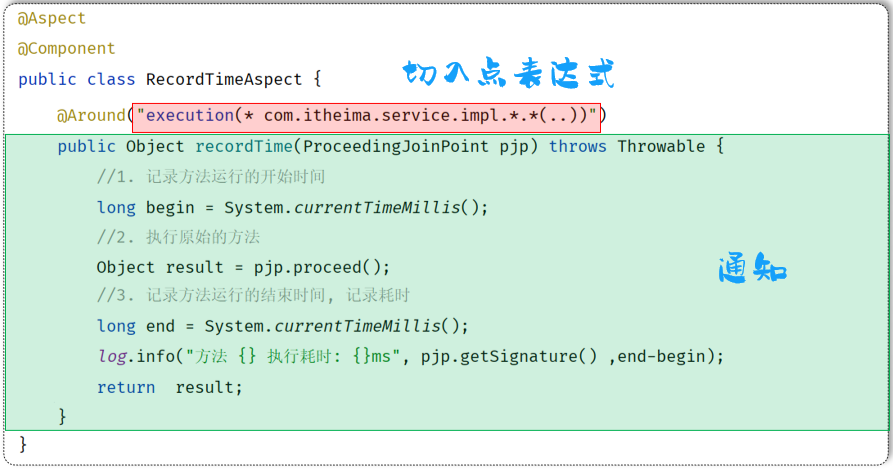
切入点
切入点其实就是要进行功能增强的方法,也就是说要对类中那个方法进行功能增强,哪个方法就是切入点,我们经常会使用切点表达式或者自定义注解的方式来挑选切入点。
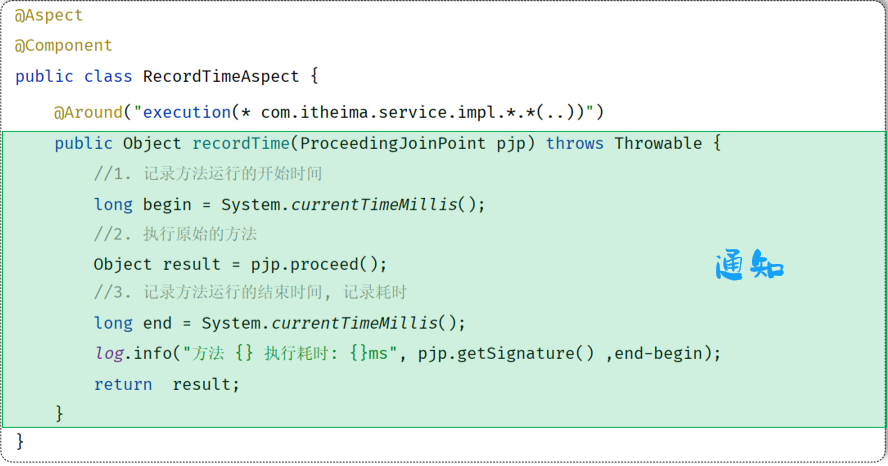
通知(Advice)
通知指那些重复的逻辑,也就是共性功能(最终体现为一个方法),例如刚才案例中计算时间的逻辑就是一个通知。
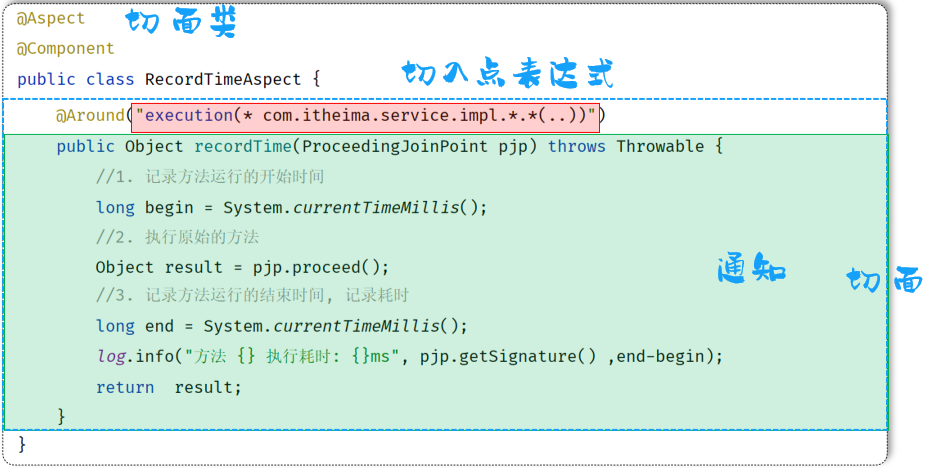
切面(Aspect)
切面描述的是通知与切入点的对应关系,也就是说切面描述了通知逻辑在切入点的什么位置执行。
AOP的通知类型
在入门程序当中,我们已经使用了一种功能最为强大的通知类型:Around环绕通知,它允许我们使用编程的方式在切点指定位置插入一些代码。
@Component
@Aspect //当前类为切面类
@Slf4j
public class TimeAspect {
    @Around("execution(* com.itheima.service.impl.DeptServiceImpl.*(..))")
    public Object recordTime(ProceedingJoinPoint pjp) throws Throwable {
        //记录方法执行开始时间
        long begin = System.currentTimeMillis();
        //执行原始方法
        Object result = pjp.proceed();
        //记录方法执行结束时间
        long end = System.currentTimeMillis();
        //计算方法执行耗时
        log.info("方法执行耗时: {}毫秒",end-begin);
        return result;
    }
}
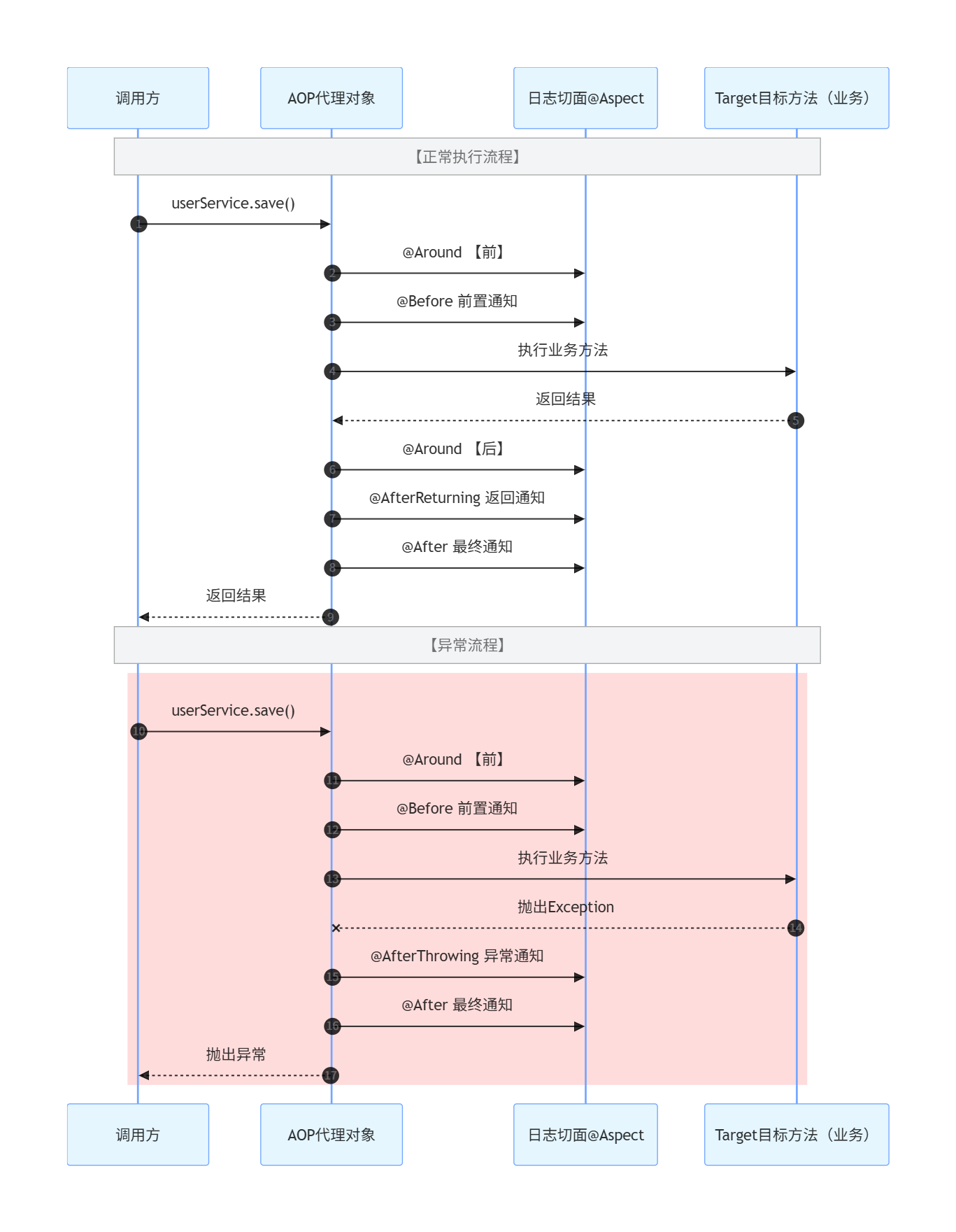
除了环绕通知之外,SpringAOP还支持如下的通知类型
| @Around | 环绕通知,此注解标注的通知方法在目标方法前、后都被执行 |
|---|---|
| @Before | 前置通知,此注解标注的通知方法在目标方法前被执行 |
| @After | 后置通知/最终通知,此注解标注的通知方法在目标方法后被执行,无论是否有异常都会执行 |
| @AfterReturning | 返回后通知,此注解标注的通知方法在目标方法后被执行,有异常不会执行 |
| @AfterThrowing | 异常后通知,此注解标注的通知方法发生异常后执行 |
下面我们通过代码演示,来加深对于不同通知类型的理解:
package com.cghbh.aspect;

import lombok.extern.slf4j.Slf4j;
import org.aspectj.lang.JoinPoint;
import org.aspectj.lang.annotation.*;
import org.springframework.stereotype.Component;

@Slf4j
@Component
@Aspect
public class MyAspect1 {
    //前置通知: 此方法的代码在目标方法执行之前执行
    @Before("execution(* com.cghbh.controller.*.*(..))")
    public void before(JoinPoint joinPoint) {
        log.info("before ...");
    }

    //后置通知: 此方法的代码在目标方法执行之后执行,无论目标方法是否发生异常
    @After("execution(* com.cghbh.controller.*.*(..))")
    public void after(JoinPoint joinPoint) {
        log.info("after ...");
    }

    //返回后通知:此方法的代码在目标方法正常执行之后执行
    @AfterReturning("execution(* com.cghbh.controller.*.*(..))")
    public void afterReturning(JoinPoint joinPoint) {
        log.info("afterReturning ...");
    }

    //异常通知:此方法的代码在目标方法发生异常时执行
    @AfterThrowing("execution(* com.cghbh.controller.*.*(..))")
    public void afterThrowing(JoinPoint joinPoint) {
        log.info("afterThrowing ...");
    }
}
使用时请注意
在使用通知时的注意事项:
@Around环绕通知需要自己调用ProceedingJoinPoint.proceed()来让原始方法执行,其他通知不需要考虑目标方法执行- @Around环绕通知方法的返回值,必须指定为Object,来接收原始方法的返回值,否则原始方法执行完毕,是获取不到返回值的。
在上面的代码中,存在什么问题呢?
//前置通知: 此方法的代码在目标方法执行之前执行
@Before("execution(* com.cghbh.controller.*.*(..))")

//后置通知: 此方法的代码在目标方法执行之后执行,无论目标方法是否发生异常
@After("execution(* com.cghbh.controller.*.*(..))")

//返回后通知:此方法的代码在目标方法正常执行之后执行
@AfterReturning("execution(* com.cghbh.controller.*.*(..))")

//异常通知:此方法的代码在目标方法发生异常时执行
@AfterThrowing("execution(* com.cghbh.controller.*.*(..))")
我们发现,每一个注解里面都指定了切入点表达式,而且这些切入点表达式都一模一样,假如此时切入点表达式需要变动,就需要挨个修改
为了简化类似代码,Spring提供了@PointCut注解,该注解的作用是将公共的切入点表达式抽取出来,需要用到时引用该切入点表达式即可,使用示例代码如下:
package com.cghbh.aspect;

import lombok.extern.slf4j.Slf4j;
import org.aspectj.lang.JoinPoint;
import org.aspectj.lang.annotation.*;
import org.springframework.stereotype.Component;

@Slf4j
@Component
@Aspect
public class MyAspect1 {

    //切入点方法(公共的切入点表达式)
    @Pointcut("execution(* com.cghbh.controller.*.*(..))")
    private void pt(){}


    //前置通知: 此方法的代码在目标方法执行之前执行
    @Before("pt()")
    public void before(JoinPoint joinPoint) {
        log.info("before ...");
    }

    //后置通知: 此方法的代码在目标方法执行之后执行,无论目标方法是否发生异常
    @After("pt()")
    public void after(JoinPoint joinPoint) {
        log.info("after ...");
    }

    //返回后通知:此方法的代码在目标方法正常执行之后执行
    @AfterReturning("pt()")
    public void afterReturning(JoinPoint joinPoint) {
        log.info("afterReturning ...");
    }

    //异常通知:此方法的代码在目标方法发生异常时执行
    @AfterThrowing("pt()")
    public void afterThrowing(JoinPoint joinPoint) {
        log.info("afterThrowing ...");
    }
}
切点表达式
切点表达式的作用是用来挑选出切点,主要有两种书写方式:
execution
execution:主要根据方法的返回值、包名、类名、方法名、方法参数等信息来匹配,语法为
execution(访问修饰符?  返回值  包名.类名.方法名(方法参数) throws 异常?)    //?部分可以省略


execution(返回值  包名.类名.方法名(方法参数))    //?部分可以省略

// * 通配符 代表一个单词
// .. 通配符 代表多个单词  * com..controller.*.*(..)


// * com.cghbh.service..*.*(..)
@annotation
根据某个方法上标注的注解匹配。
实现步骤:
- 编写自定义注解类
Logger - 在需要成为切点的方法上添加自定义注解
- 自定义切面类,在类中使用自定义注解方式声明切点
先定义一个自定义注解
package com.cghbh.annotation;

import java.lang.annotation.ElementType;
import java.lang.annotation.Retention;
import java.lang.annotation.RetentionPolicy;
import java.lang.annotation.Target;

@Target(ElementType.METHOD) // 指定注解能够使用的位置,其中Type表示使用在类上面,METHOD表示注解加载方法上
@Retention(RetentionPolicy.RUNTIME)
public @interface Logger {
    String value() default ""; // 这个是注解@Logger(value="")的value属性,没有的话默认是""
}
然后在需要使用的地方添加自定义的注解
package com.cghbh.controller;


import com.cghbh.annotation.Logger;
import com.cghbh.common.PageResult;
import com.cghbh.common.Result;
import com.cghbh.dto.DeptPageDto;
import com.cghbh.entity.Dept;
import com.cghbh.service.DeptService;
import lombok.RequiredArgsConstructor;
import lombok.extern.slf4j.Slf4j;
import org.springframework.web.bind.annotation.*;

import java.util.List;


@Slf4j
@RequiredArgsConstructor
@RestController
public class DeptController {
    private final DeptService deptService;

    /**
     * 分页查询部门列表
     *
     * @param deptPageDto 分页数据
     * @return 部门列表和总条数
     */
    @Logger(value = "分页查询部门列表")
    @GetMapping("/depts")
    public Result getDeptListByPageByDto(DeptPageDto deptPageDto) {
        log.info("请求的参数:{}", deptPageDto);
        PageResult<Dept> deptPageResult = deptService.getDeptListByPage(deptPageDto);
        return Result.success(deptPageResult);
    }

    /**
     * 新增部门
     *
     * @param dept 部门数据
     * @return 无
     */
    @Logger(value = "新增部门")
    @PostMapping("/depts")
    public Result addDept(@RequestBody Dept dept) {
        log.info("新增部门的数据:{}", dept);
        deptService.addDept(dept);
        return Result.success();
    }
}
使用的方式如下:
// 使用的方式一
@Around("@annotation(com.cghbh.annotation.Logger)")
    public Object addOperateLog(ProceedingJoinPoint joinPoint) throws Throwable
        // 开始时间
        long startTime = System.currentTimeMillis();
        Object result = joinPoint.proceed();
        // 结束时间
        long endTime = System.currentTimeMillis();
        // 请求的耗时
        long cost = endTime - startTime;
		logger.info("当前请求的耗时是:{}", cost)
        return result;
    }
}

// 使用的方式二
@Around("@annotation(logger)")
    public Object addOperateLog(ProceedingJoinPoint joinPoint, Logger logger) throws Throwable
        // 开始时间
        long startTime = System.currentTimeMillis();
        Object result = joinPoint.proceed();
        // 结束时间
        long endTime = System.currentTimeMillis();
        // 请求的耗时
        long cost = endTime - startTime;
		logger.info("当前请求的耗时是:{}", cost)
        return result;
    }
}

// 上面两个注解表达的都是一个意思,只是使用的用法不一样,表示所有加了@Logger注解的方法都会增加计算请求耗时的业务逻辑
// 另外使用的时候请注意:@Logger单独加载class上没有效果。
切入点
在Spring中用JoinPoint抽象了切入点,用它可以获得方法执行时的相关信息,如目标类名、方法名、方法参数等
对于@Around通知,获取连接点信息只能使用ProceedingJoinPoint类型。
import org.aspectj.lang.ProceedingJoinPoint;
import org.aspectj.lang.annotation.Around;
import org.aspectj.lang.reflect.Signature;

@Around("execution(* com.cghbh.service.DeptService.*(..))")
public Object around(ProceedingJoinPoint joinPoint) throws Throwable {
    String className = joinPoint.getTarget().getClass().getName(); // 获取目标类名
    Signature signature = joinPoint.getSignature(); // 获取目标方法签名
    String methodName = joinPoint.getSignature().getName(); // 获取目标方法名
    Object[] args = joinPoint.getArgs(); // 获取目标方法运行参数
    Object res = joinPoint.proceed(); // 执行原始方法,获取返回值(环绕通知)
    return res;
}对于其他四种通知,获取连接点信息只能使用JoinPoint类型
import org.aspectj.lang.JoinPoint;
import org.aspectj.lang.annotation.Before;
import org.aspectj.lang.reflect.Signature;

@Before("execution(* com.cghbh.service.DeptService.*(..))")
public void before(JoinPoint joinPoint) {
    String className = joinPoint.getTarget().getClass().getName(); // 获取目标类名
    Signature signature = joinPoint.getSignature(); // 获取目标方法签名
    String methodName = joinPoint.getSignature().getName(); // 获取目标方法名
    Object[] args = joinPoint.getArgs(); // 获取目标方法运行参数
}
使用提示
在将args,res这样的结果存储为数据库的String类型的时候,需要使用`JSONUtil.toJsonStr进行转换。
AOP的结果图